
For developers · two protocols, one key
The same private layer, behind your own code
One key, many models. R2 routes your application's traffic through the same encrypted path as our add-ins, so what you build inherits the privacy properties instead of reimplementing them. Two ways in: our own API, or the OpenAI Responses-compatible protocol for tools you already use.
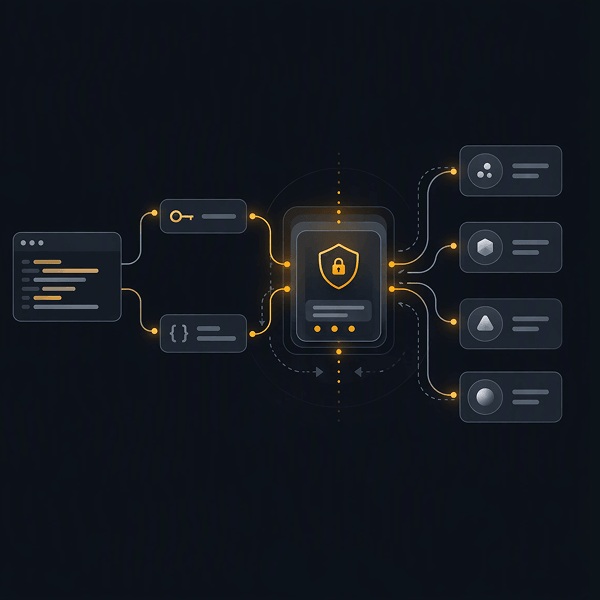
Two protocols, one key
R2 Custom API
Our native protocol. Full control over the model, the system instruction, output size, web search, attachments, uploaded files and the conversation history you pass in. Use it when you are building a product feature and want everything R2 exposes.
- Model selection per request, plus a separate image model
- File upload, download, listing and deletion
- Selection and file attachments on a message
- Explicit result codes for balance, access and maintenance
OpenAI Responses-compatible protocol
Point tooling that already speaks the OpenAI Responses API at R2 and give it your R2 key. Coding agents such as Claude Code and Codex, internal services and existing SDK integrations work without a rewrite, and the traffic runs through R2's encrypted, governed path.
- Keep your existing client and SDK
- Swap the base URL and the key
- Full Responses API parameter support
- Same policy set, same audit trail as the add-ins
Same base URL as the custom API, https://api-chat.r2copilot.ai, with full Responses API parameter support.
Getting a key
Keys are issued from the web app, against a subscription you already hold. Usage draws on that subscription's token allowance, so an integration is billed the same way a seat is.
Open settings
Go to Settings, then the API keys section.
Pick a subscription
Choose which of your subscriptions the key draws against, and which protocol it is for.
Create the key
Copy it once and store it in your secret manager. Send it on every request as the x-api-key header.
A request looks like this
One POST to /api/msg/send/sync with the model, a system instruction and the text. The response returns the exchange as chat history, which you pass back on the next call to continue the conversation.
Switching model is a parameter change, not a second integration and not a second security review. The access rules and PII controls your admin set apply to API traffic exactly as they do to the add-ins.
Endpoints, fields and result codes →curl https://api-chat.r2copilot.ai/api/msg/send/sync \
-H "x-api-key: $R2_API_KEY" \
-H "Content-Type: application/json" \
-d '{
"model": "GPT_54_mini",
"instruction": "You are R2 Copilot, an intelligent assistant. Answer formally.",
"text": "Summarise the attached claim file.",
"max_bytes_output": 2000,
"use_web_search": false
}'const hostUrl = "https://api-chat.r2copilot.ai";
const body = {
text: "Summarise the attached claim file.",
model: "GPT_54_mini",
instruction: "You are R2 Copilot, an intelligent assistant.",
max_bytes_output: 2000,
use_web_search: false,
environment: { time: "2026-08-25T14:30:00+03:00", locale: "en-US" },
chat_history: []
};
const res = await fetch(`${hostUrl}/api/msg/send/sync`, {
method: "POST",
headers: {
"x-api-key": process.env.R2_API_KEY,
"Content-Type": "application/json"
},
body: JSON.stringify(body)
});
const data = await res.json();
console.log(data.chat_history.at(-1).content.text);import os, requests
resp = requests.post(
"https://api-chat.r2copilot.ai/api/msg/send/sync",
headers={"x-api-key": os.environ["R2_API_KEY"]},
json={
"text": "Summarise the attached claim file.",
"model": "GPT_54_mini",
"instruction": "You are R2 Copilot, an intelligent assistant.",
"max_bytes_output": 2000,
"use_web_search": False,
},
).json()
print(resp["chat_history"][-1]["content"]["text"])Model names come from GET /api/models.
Built for applications, not just chat
Model routing
Switch models with a parameter. Ask /api/models for the live list, families, labels and byte limits rather than hardcoding them.
Policy inheritance
The access rules and PII controls your admin set apply to API traffic too. Your application cannot accidentally become the loose surface.
Deployment choice
Point at our routed network, at your self-hosted models, or at R2 running inside your own tenant, air-gapped if required.
What people build with it
Coding agents in a regulated codebase
Run Claude Code, Codex or your own agent against R2 through the compatible protocol, so source code and secrets do not go straight to a model vendor.
AI features in your own product
Ship AI to your regulated customers without holding their prompts, and hand them the audit trail as part of what they buy.
Document pipelines
Upload a file, attach it to a message and get a summary or extraction back, with the file lifecycle managed through the file endpoints.
Internal services and workflows
Put a governed model behind a queue, a ticket router or an internal tool, under the same policy set as the desktop surfaces.
Start with a key and a curl
One API key, every major model and the same governed path as the add-ins.